| Communication |
| Jeweller communication technology |
| Proprietary wireless communication technology to transmit commands, alarms, and events. |
| Key features: |
| Two-way communication. |
| Advanced sabotage protection. |
| Block encryption featuring a dynamic key. |
| Instant notifications. |
| Remote configuration in the Ajax apps. |
| Learn more |
| Frequency bands |
| 866.0 – 866.5 MHz |
| 868.0 – 868.6 MHz |
| 868.7 – 869.2 MHz |
| 905.0 – 926.5 MHz |
| 915.85 – 926.5 MHz |
| 921.0 – 922.0 MHz |
| Depends on the sales region. |
| Maximum effective radiated power (ERP) |
| up to 20 mW |
| Automatic power control to reduce power consumption and noise interference. |
| Radio signal modulation |
| GFSK |
| Radio signal range |
| up to 1,700 m |
| Between keypad and hub (or range extender) in an open space. |
| Calculate the radio signal range at the facility |
| Encrypted communication |
| All the data stored and transmitted are protected by block encryption with a dynamic key. |
| Frequency hopping |
| Radio communication uses frequency hopping to prevent interception and jamming. |
| Learn more |
| Wings communication technology |
| Proprietary wireless communication technology to transmit large data packets. |
| Key features: |
| Two-way communication. |
| Block encryption featuring a dynamic key. |
| Advanced sabotage protection. |
| Reloading the data packages in case of transmission errors. |
| Learn more |
| Frequency bands |
| 866.0 – 866.5 MHz |
| 868.0 – 868.6 MHz |
| 868.7 – 869.2 MHz |
| 905.0 – 926.5 MHz |
| 915.85 – 926.5 MHz |
| 921.0 – 922.0 MHz |
| Depends on the sales region. |
| Radio signal range |
| up to 1,700 m |
| Between keypad and hub (or range extender) in an open space. |
| Calculate the radio signal range at the facility |
| Encrypted communication |
| All stored and transmitted data are protected by block encryption with a dynamic key. |
| Frequency hopping |
| Radio communication uses frequency hopping to prevent interception and jamming. |
| Learn more |
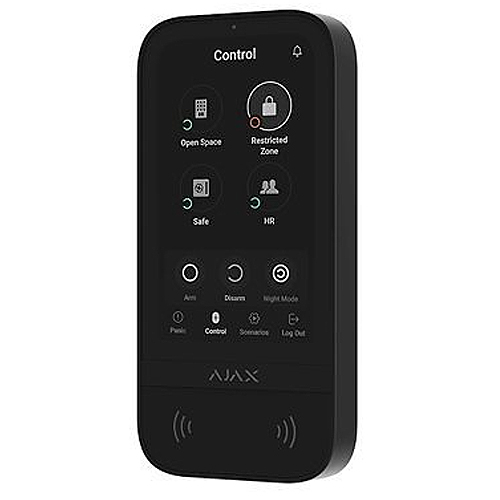
| Display |
| Diagonal |
| 5″ |
| Matrix type |
| IPS |
| Resolution |
| 480 × 854 px |
| Sensor |
| capacitive |
| Brightness settings |
| automatic |
| manual |
| If Auto Adjust is enabled, the display brightness depends on the light conditions. This saves battery power. |
| Backlight lifetime |
| 30,000 hours |
| Guaranteed backlight lifetime when the Always Active Display toggle is enabled. It can be adjusted in Ajax apps and activates only when external power is connected. |
| User interface |
| Dark |
| Light |
| Key features |
| Panic buttons |
| panic |
| fire |
| auxiliary help |
| Sending an alarm or calling for help from the separate keypad tab. |
| Control |
| codes |
| Tag key fobs |
| Pass cards |
| smartphone (Bluetooth) |
| Contactless access |
| DESFire® EV1, EV2 |
| ISO14443-? (13.56 MHz) |
| Access codes |
| up to 200 personal codes |
| One code per each user. The number of personal access codes depends on the hub model. |
| 1 keypad code |
| Per each KeyPad TouchScreen Jeweller. |
| Duress codes |
| up to 200 personal codes |
| One code per each user. The number of personal duress codes depends on the hub model. |
| 1 keypad code |
| Per each KeyPad TouchScreen Jeweller. |
| Codes for unregistered people |
| up to 99 personal codes |
| For people who are not registered in the Ajax system. The number of such codes depends on the hub model. |
| Arming without entering a code |
| The enabled feature allows the user to arm the system without entering a code or presenting the access device. |
| Group management |
| Changing the security mode of the groups to which the user has access from the keypad’s display. |
| Learn more |
| Scenarios management |
| A separate keypad tab contains up to 6 buttons, and each one can control one automation device or a group of devices. |
| Learn more |
| Indication of malfunctions and security mode |
| display |
| logo |
| sound indication |
| If enabled, the logo lights up red continuously or when the system or group is armed. KeyPad TouchScreen Jeweller indication is shown on the display only when it is active. Built-in buzzer notifies about alarms, door openings and entry/exit delays. |
| Acknowledgment of the latest events |
| up to 100 events |
| Displays the latest system events since the last check. Events are grouped and sorted by the date of their occurrence. |
| Learn more |
| Fire alarm muting |
| Turns off the fire detectors alarm, including the interconnected alarm. |
| Learn more |
| User pre-authorization |
| When the feature is enabled, viewing the current system status and control screen is unavailable. For access, the user must pre-authorize: enter a code or present a personal access device to the keypad. |
| Contactless authorization with a smartphone |
| A smartphone with the installed Ajax app and Bluetooth Low Energy (BLE) support can be used instead of Tag or Pass to authorize a user. BLE is a radio protocol with low power consumption. The keypad supports Android and iOS smartphones with BLE 4.2 and higher. |
| Auto screen wakeup |
| The keypad wakes up automatically when approaching it. The approaching distance can be adjusted in the app. |
| Remote firmware update |
| When a new firmware is available, an admin or PRO with the rights to configure the system can run the update in Ajax apps. |
| The keypad must be connected to an external power supply to update the firmware. |
| Learn more |
| ACE Type |
| type B |