| Device compatibility |
| Check |
| Capacity |
| Devices |
| up to 200 |
| Supports Ajax devices from the EN54 product line, wireless intrusion devices, and resettable buttons for manual fire alarm activation in any combination, except for the following: |
| up to 10 intrusion sirens; |
| up to 50 keypads with a built-in buzzer; |
| up to up to 5 EN54 Fire ReX Jeweller range extenders. |
| More about devices |
| Fire zones |
| up to 40 |
| Alerts about fire in separate zones. Every zone may include multiple rooms. |
| Ajax NVRs |
| up to 36 |
| Learn more |
| Ajax cameras |
| up to 224 via Ajax NVRs and up to 492 standalone |
| Learn more |
| Third-party IP cameras |
| up to 10 when using RTSP via SDK |
| up to 224 when using ONVIF via Ajax NVRs |
| Learn more |
| Users |
| up to 200 |
| Any number of admin users within the CIE limit. |
| PRO accounts for installers. |
| PRO accounts for installation and monitoring companies. |
| Access management for users. |
| Automation scenarios |
| up to 64 |
| By alarm. |
| By schedule. |
| By arming/disarming. |
| By temperature, humidity, CO2 concentration. |
| By pressing Button. |
| By touching LightSwitch. |
| Learn more |
| Rooms |
| up to 80 |
| Event log |
| up to 5,000 events |
| Fire alarm system events. Can be viewed on the CIE display. Events are saved on the non-volatile onboard flash memory. |
| up to 500 events |
| Fire alarm, intrusion, and other system events. Can be viewed in the events feed in Ajax apps. |
| Communication |
| Jeweller communication technology |
| Proprietary wireless communication technology to transmit commands, alarms, and events. |
| Key features: |
| Two-way communication. |
| Advanced sabotage protection. |
| Block encryption featuring a dynamic key. |
| Instant notifications. |
| Remote control and configuration in Ajax apps. |
| Learn more |
| Frequency bands |
| 866.0–866.5 MHz |
| 868.0–868.6 MHz |
| 868.7–869.2 MHz |
| 905.0–926.5 MHz |
| 915.85–926.5 MHz |
| 921.0–922.0 MHz |
| Depends on the sales region. |
| Maximum effective radiated power (ERP) |
| up to 20 mW |
| Automatic power control to reduce power consumption and radio interference. |
| Radio signal modulation |
| GFSK |
| Radio communication range |
| up to 1,800 m |
| Between the CIE and connected devices (in an open space). Maximum range depends on the connected device. |
| Learn more |
| Encrypted communication |
| All stored and transmitted data are protected by block encryption featuring a dynamic key. |
| Frequency hopping |
| To prevent radio interference and jamming. |
| Learn more |
| Wings communication technology |
| Proprietary wireless communication technology to transmit photo verifications and update firmware. |
| Key features: |
| Two-way communication. |
| Advanced sabotage protection. |
| Block encryption featuring a dynamic key. |
| Data packages reload in case of transmission errors. |
| Photo delivery check. |
| Frequency bands |
| 866.0–866.5 MHz |
| 868.0–868.6 MHz |
| 868.7–869.2 MHz |
| 905.0–926.5 MHz |
| 915.85–926.5 MHz |
| 921.0–922.0 MHz |
| Depends on the sales region. |
| Radio communication range |
| up to 1,800 m |
| Between the CIE and connected devices (in an open space). Maximum range depends on the connected device. |
| Learn more |
| Encrypted communication |
| All stored and transmitted data is protected by block encryption featuring a dynamic key. |
| Frequency hopping |
| To prevent radio interference and jamming. |
| Learn more |
| Communication channels |
| Ethernet |
| 1 8P8C socket |
| Up to 100 Mbps. |
| Cellular |
| 2 micro-SIM slots |
| Cellular frequencies |
| 2G |
| GSM900/DCS1800 (B3/B8) |
| 4G (LTE) |
| FDD B1/B3/B5/B7/B8/B20 |
| Wi-Fi |
| 802.11 b/g/n module |
| up to 72 Mbps. |
| Automatic switching between communication channels |
| Instant switching between Ethernet, Wi-Fi, and SIM. |
| Instant switching between 4G (LTE), 3G, and 2G networks of one SIM. |
| Switching between SIMs takes up to 4 minutes. |
| Communication channels prioritization |
| 1. Ethernet |
| 2. Wi-Fi |
| 3. Cellular connection |
| Communication channels work in parallel to increase the system’s reliability. Most of the data is transmitted via Ethernet. |
| Notifications |
| Supported notification types |
| Push notifications |
| SMS |
| Calls |
| Learn more |
| Event types |
| Alarms |
| Video alerts |
| Faults (for fire alarm devices) |
| Malfunctions (for other Ajax devices) |
| Security state change |
| System events |
| Non-security alerts |
| Automation devices |
| Smart lock events |
| Doorbell ringing |
| The notification types are configured individually for each user. |
| Monitoring |
| Supported protocols |
| SIA (DC-09) |
| SurGard (Contact ID) |
| Learn more |
| Event types |
| System alarms and events |
| Panic button coordinates |
| Photo verification |
| Learn more |
| Fire alarm system management |
| Indication of fire alarms and faults |
| display |
| LED indicators |
| sound |
| LEDs on the front panel of the CIE and the built-in buzzer notify users of fire alarms in zones, faults, and system states. In case of fire, the CIE also activates visual alarm devices and fire alarm sounders. The CIE display also shows system states and detailed alarm information. |
| Fire alarm control |
| start evacuation |
| reset |
| mute buzzer |
| silence / resound sounders |
| override delays (coming soon) |
| indication test |
| Users with appropriate rights can manage the fire alarm system via these options. |
| Fire alarm system settings |
| Users with appropriate rights can configure all fire alarm system settings via the CIE. |
| Event log |
| Stores a detailed log of fire alarms and system events. Capacity: up to 5,000 events. |
| Photo verification |
| Photo verification types |
| Photo by alarm |
| Photo by scenario |
| Photo on demand |
| Photo by schedule |
| Photo by arming/disarming |
| More about photo by scenario |
| More about photo on demand |
| More about photo by schedule |
| More about photo by arming/disarming |
| Photo delivery time |
|
|
| By default. |
| Learn more |
| Photo resolution |
| up to 960 × 720 pixels |
| Depends on the detector. |
| Number of photos in a series |
| from 1 to 5 pictures |
| Additional features |
| User authorization |
| To manage the fire alarm system via the CIE touch screen, the user must log in by entering a code or presenting a personal access device. |
| Control |
| codes |
| Tag key fobs (coming soon) |
| Pass cards (coming soon) |
| Contactless access (coming soon) |
| DESFire® EV1, EV2 |
| ISO14443-? (13.56 MHz) |
| Access codes |
| up to 200 codes |
| One code per each user. Defines user access level to security and fire alarm system management. |
| Duress codes |
| up to 200 personal codes |
| One code per each user. |
| Built-in buzzer |
| volume at least 60 dB at a distance of 1 m |
| Sound alerts of fire alarms. |
| volume at least 50 dB at a distance of 1 m |
| Sound alerts of faults. |
| LED indication |
| red |
| For fire alarms. |
| yellow |
| For device faults, tests, and disablements. |
| green |
| For power supply status. |
|
|
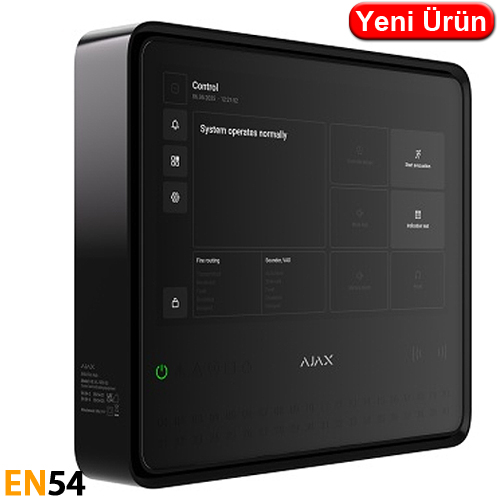
| The special tool is used to unlock the housing and replace the internal battery or dismantle the device from the SmartBracket mounting panel. The battery is not included in the CIE complete set. |
| Learn more |
| Display |
| Diagonal |
| 10.1″ |
| Matrix type |
| IPS |
| Resolution |
| 1024 × 600 px |
| Sensor |
| capacitive |
| Backlight settings |
| Manually adjustable in the CIE on-screen settings. |
| Interface language |
| Configurable via the CIE touch screen or in the CIE settings in Ajax apps. |
| Outputs |
| Output 1 |
| Relay output for alerting the monitoring company in case of a system fault. Contact state is normally closed (NC) by default. |
| Output 2 |
| Relay output for alerting the monitoring company in case of a fire alarm. Contact state is normally open (NO) by default. |
| Operating mode |
| bistable |
| External power supply |
| 10–30 V? |
| The relay does not supply power to connected devices. |
| Energy consumption |
| up to 60 W |
| In standby mode. |
| Maximum resistive load |
| up to 2 A at 30 V? |
| Maximum inductive/capacitive load |
| up to 2 A at 30 V? |
| Installation recommendations |
| The device is designed for indoor use only. |
| Use GlandBox if power and signal cables are not routed inside the wall. |
| The device operating voltage is 110–240 V~. |
| Sabotage protection |
| Tamper button |
| Notifications about the fault on attempts to detach the device from the surface or remove the mounting panel. |
| Learn more |
| Protection against spoofing |
| device authentication |
| Connection loss detection |
| after 36 s |
| Detection time depends on Jeweller settings. |
| Power supply |
| External |
| 110–240 V, 50/60 Hz |
| Up to 0.48 A of mains power consumption. |
| Internal |
| 7.4 V?, 5 Ah/10 Ah |
| On Rechargeable Li-ion battery not included in the complete set: EN54 Internal Battery (24h) or EN54 Internal Battery (72h). |
| Learn more |
| Autonomous operation |
| On internal battery |
| up to 24 hours |
| On EN54 Internal Battery (24h) not included in the complete set. Battery life is based on display activation only when tapped, using W-Fi, Ethernet, and cellular (LTE) communication channels. |
| up to 72 hours |
| On EN54 Internal Battery (72h) not included in the complete set. Battery life is based on display activation only when tapped, using W-Fi, Ethernet, and cellular (LTE) communication channels. |
| Learn more |
| Enclosure |
| Dimensions |
| 263 × 223 × 54 mm |
| Weight |
| 1,526 g |
| Operating temperature range |
| from -10 °C to +40 °C |
| Operating humidity |
| up to 75% non-condensing |
| Protection class |
| IP20 |
| Flammability rating |
| UL 94 V-0 |
| Color |
| Black |
| White |
| Complete set |
| EN54 Fire Hub Jeweller |
| SmartBracket mounting panel |
| Installation kit |
| Ethernet cable |
| Special tool (key) |
| Quick start guide |
| Revision |
| 1 |